Brainbaby, the all-in-one AI chat, image and video generator, website and mobile app builder, and presentation maker: Ask anything.
Make it happen.
AI chat with Baby 5.0, an AI image generator and editor, an AI video generator, a presentation maker, an AI website builder, an AI mobile app builder that needs no code, and Baby Code for your repositories.


A little less busywork
Don’t just ask.
Build apps and websites with AI.
Write it. Make it. Build it.
See how a conversation can become
something you can actually use.
Create a simple daily habits app with a home screen and a weekly progress view.
Make something people can tap.
Start with an idea and iterate on a working preview. Store submission is a separate step.
Build an appGood morning,
Alex.
Small things add up.
Animated examples, not live tasks. Connected accounts, plan limits and your approvals apply.
Brainbaby for iOS and Android.
Free to download. Features and usage depend on your plan.BABY 5.0
AI chat for clearer thinking.
Think it through. Write it better. Create something new.
What can you do with Brainbaby?
Help me make a little more room in my week.
A clearer way to think.
Let’s start small. Choose one thing to make easier, one thing to look forward to, and one thing you can leave for later.
What tends to take up more time than you’d like?
A little room for you
Less rush.
More possibility.
Make one thing easierStart with the part that feels hardest.
Keep something for yourselfA walk. A book. An idea worth a try.
Let the rest waitNot everything needs to happen today.
A few possibilities, illustrated. You bring the next one.
More than an answer
Create AI images and video.
Write documents and code.
Go from “what if” to a first draft, a new image,
or the start of your next project.
 Made of imagination.
Find your visual language.
Create images and explore video from your ideas.
Big ideas.
Clear words.
A proposal worth opening.
A story worth sharing.
A place to begin.
Make work feel lighter.
Write documents and shape ideas into presentations.
Your next
“I built that.”
Build what’s on your mind.
Explore code, connect a repository, or create a website.
Four images. Four starting points.
Explore the details, copy an example prompt, and make the idea your own.
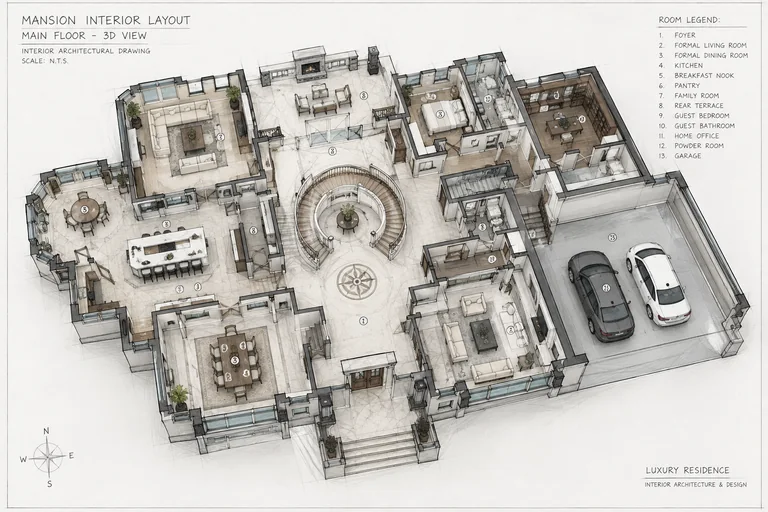



Architectural imagination
Suggested prompt
A detailed isometric cutaway of a luxury mansion’s main floor, drawn in fine pencil and soft watercolor on ivory architectural paper. Show a grand circular staircase, marble foyer, furnished living and dining rooms, kitchen island, guest suite, office and two-car garage. Include numbered rooms, a handwritten room legend, a compass and subtle construction lines.
A quiet morning in Paris
Suggested prompt
A cinematic 35mm film photograph of a couple in their thirties sharing a quiet morning in a cozy Paris apartment. A dark-haired man reads a French novel beside a smiling blonde woman resting under soft linen. Warm lamplight mixes with natural window light; Paris rooftops and Sacré-Cœur appear beyond the balcony. Close framing, gentle film grain, natural skin texture and muted colors.
A story written by the sea
Suggested prompt
An extreme close-up cinematic portrait of a weathered pirate captain aboard a wooden sailing ship. He wears an aged black tricorn hat with feathers, long dark hair and a thick beard with small braided details. Focus on his piercing pale eyes and sun-worn skin. Ocean, rigging and pale sky blur behind him. Natural daylight, dramatic texture and subtle film grain.
Times Square, reimagined
Suggested prompt
A vibrant anime illustration of Times Square on a clear summer afternoon. Fill the scene with colorful billboards, yellow taxis, American flags and lively crowds beneath a brilliant blue sky with fluffy clouds. Place a cheerful traveler in his twenties in a red hoodie in the foreground and detailed New York architecture in the distance. Rich colors, crisp linework and a wide cinematic composition.
A starting idea, not a promise of the same image. An account is required; review the studio’s allowance and credit cost before generating.
Meet Brainbaby for desktop · Mac preview
An AI desktop app.
Right where you work.
Bring the conversation closer to the work. Chat, code, and a browser that opens beside you—all in one Brainbaby window.
Download for MacOpen my project and check how the page looks.
The page, beside the conversation.
Give the browser a task from Chat or Baby Code. Follow the work in a side panel and take control when you need to.
Make time
for something
good.
Explore the journalInspecting page · ExampleMac public preview is available. Windows is coming soon.
View availabilityA little more you
AI with memory.
Pick up where you left off.
Save the preferences and context that matter. Brainbaby can use them in later conversations, so every idea doesn’t have to start from scratch.
You choose what to keep. Manage your saved memories in settings.
Get to know BrainbabyStart with a question. See where it goes.
Your next idea is welcome here.
Need more room? Paid plans offer higher limits.
Image, video, and builder allowances vary by plan.
Try an example. Make it your own.
What is Brainbaby?
Brainbaby is an all-in-one AI workspace made by Brainbaby Labs. One account lets you chat with an AI assistant, generate and edit images and videos, build presentations, create websites and mobile apps without code, and code with Baby Code. It runs on the web, iOS, Android and Mac; a free account includes a weekly chat allowance and one free image.
- Made by
- Brainbaby Labs
- Price
- Paid plans from $4/month (Brainbaby Go $4/mo, Pro $20/mo, Pro+ $100/mo, Max $200/mo); App Builder and Website Builder are included from Pro ($20/month); image and video work uses credits
- Free
- Free chat uses a recurring weekly token allowance that resets in full every seven days; one free image (a generation or an edit) after email confirmation
- Platforms
- Web, iOS, Android and a Mac desktop preview
- Languages
- App interface in 22 languages; product pages published in 53 languages
Questions about Brainbaby AI.
Is Brainbaby free to use?
Yes. You can start free without a card: a free account includes a chat allowance that resets every 7 days and one free image (a new image or an edit) after you confirm your email. Paid plans start at $4/month, image packs start at $5 for 5 credits, and video uses its own credits.
What can I do with Brainbaby?
Chat and write with Baby 5.0, generate and edit images, make videos from text or an image, build presentations you can export as PowerPoint or PDF, create websites and mobile or web apps from a description, and work on GitHub repositories with Baby Code. It all happens in one account on the web, iOS, Android and Mac.
Is Brainbaby a ChatGPT alternative?
Brainbaby brings chat with memory, image and video generation, presentations, documents, app building and coding into one workspace. Choose the tools and plan that fit your work.
Where can I learn about data privacy?
Brainbaby’s policy is not to use private conversations or uploads to train foundation models; outside AI providers have their own terms. The privacy and security pages explain how requests are processed, and account settings let you manage and delete your information.
More about features and tools
How does AI image generation work on Brainbaby?
Describe an image in chat or Image Studio, or upload a photo you may edit and say what to change. Each new image or edit uses one image credit, and your first one is free after you confirm your email. Compare an edit with your original before using it.
How do I make AI videos?
Open Video Studio or ask for a video in chat. A text prompt makes a clip of 2 to 30 seconds at 480p, 720p or 1080p; an image you may use makes a clip of 5 to 15 seconds. Video uses separate video credits, the cost is shown before you generate, and the free plan includes none.
Can I build websites and apps without coding?
Yes. Describe the site or app and Brainbaby builds a first version you can preview, then changes it when you ask in chat. Publish a website to a public Brainbaby link or download its code, and export a mobile app as a React Native and Expo project. The builders are included in Pro and higher plans.
What is Baby Code?
Baby Code is Brainbaby’s coding workspace. Attach a GitHub repository or files, ask Baby 5.0 to map the code, debug a problem you can reproduce or plan a change, and review the proposed edits before you keep them. Coding with GitHub is included in Pro and higher plans.
How do I make a presentation with AI?
Give Brainbaby the topic, audience and number of slides, and paste any notes. It plans an outline and writes each slide in the theme you choose. Edit on the canvas, present full screen, or export an editable PowerPoint (PPTX) file or a PDF.
What AI models does Brainbaby use?
Baby 5.0 powers chat, reasoning and coding with a mixture-of-experts language model. Image and video tools use specialized services.
How does Brainbaby's AI memory work?
Brainbaby can use saved preferences and context from earlier conversations to make later answers more relevant. You can manage your saved information in account settings.
What is MCP and does Brainbaby support it?
MCP is a standard for connecting AI to tools and data sources. Brainbaby supports MCP connections for compatible services and custom tools.
Can Brainbaby handle multi-step tasks?
On paid plans, Agent Mode can work through tasks involving web research, files, tools and code. The available actions depend on your connected tools and permissions.
Does Brainbaby support voice conversations?
Voice mode lets you speak to Brainbaby and listen to its responses instead of typing.
Which devices does Brainbaby run on?
Brainbaby runs in a web browser, in the iOS and Android apps, and as a public preview for Mac. A Windows app is not available yet.
What are Brainbaby Artifacts?
Artifacts display outputs such as interactive code previews, diagrams, documents, spreadsheets and presentations alongside your conversation.